Text message opt-in
Fullingim Brothers Enterprise, doing business as Texas Wedge Indoor Golf (“Texas Wedge”) · Lubbock, Texas
Texas Wedge texts its own customers. A one-time code is texted only when a customer asks for one. Account texts (not marketing) are about bookings the customer makes with us: we say so where they give us their number to book, online, by phone or at the desk, and they can turn them off any time. Offers and events (marketing) go only to customers who tick a separate, optional, unticked box. No box is ever pre-ticked, and every form works without it: Saying yes to texts is never a condition of signing up, booking, joining or buying anything.
1. One-time codes (only when asked for)
A code to sign in or to confirm a number, sent once each time the customer asks.
Sign-in and account sign-up · see the page
Customers sign in with a code instead of a password. This line sits under the phone number; a code is texted only when they press Continue to ask for one.
“We'll text a one-time code to this number when you ask for one. Msg & data rates may apply.”
Offer pages
The page asks one thing, the mobile to text the offer code to, and this line sits under the button. Pressing it texts the code and a link to book with it. The offer is claimed whether or not the separate offers box (section 3) is ticked.
“We'll text your code and a link to book with it. Msg & data rates may apply. Reply STOP to opt out.”
Event planning page · see the page
Booking a call with our events coordinator confirms the number with a code. The confirmation and reminder are a separate optional box (section 2).
“We text a one-time code to confirm your number. Msg & data rates may apply.”
2. Account texts (not marketing)
Booking confirmations, reminders and changes for bookings the customer makes, and replies to their own request when they tick the box for it. Customers turn booking texts off on their My account page, or by replying STOP.
Account sign-up · see the page
Customers make an account to book. This notice sits under the form, beside the sign-in code line, and we text only about the bookings they make. The separate offers box (section 3) is optional and unticked. Customers can turn booking texts off any time on their My account page, or reply STOP.
“We'll text your booking confirmations and reminders to this number. Message frequency varies. Msg & data rates may apply. Reply STOP to opt out, HELP for help.”
Booking pop-up (a new customer booking a bay) · see the page
At app.texaswedge.golf/book a customer picks Book a Bay, a day, how many are playing, a length and a time, then Review & book. Signed out, a pop-up asks for their mobile number; for a number we don't know it asks for name and email, with the same notice under them. The screenshot below is that pop-up.
“We'll text your booking confirmations and reminders to this number. Message frequency varies. Msg & data rates may apply. Reply STOP to opt out, HELP for help.”
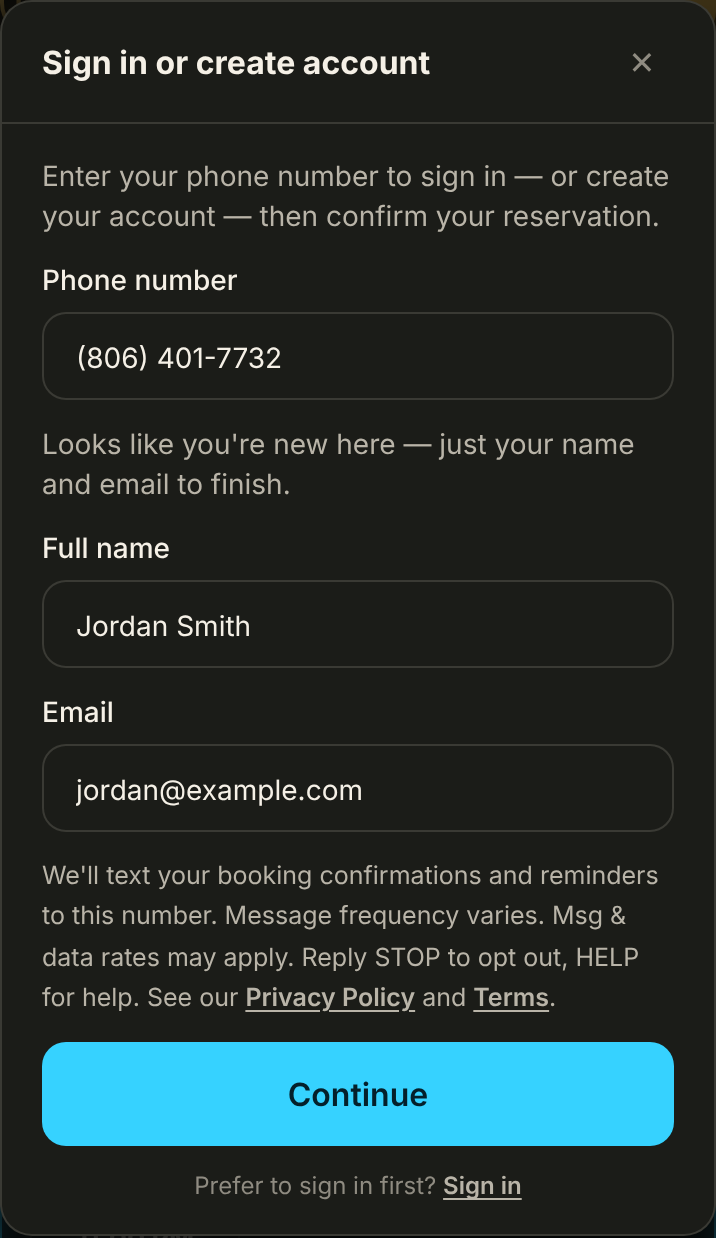
Screenshot: Booking pop-up for a new customer: phone, name, email and the notice that we'll text their booking confirmations and reminders. Booking by phone or at the front desk
When a customer calls or comes to the desk to book, they give our staff their mobile number for that booking. Before booking, staff read them the script below from their screen and ask whether we may text them. We then text only about that booking: the confirmation, a reminder and any change. If the customer says no, staff tick “They said no” and no booking texts are sent; replying STOP later does the same.
“This is Texas Wedge Indoor Golf. We'd like to text this number about your booking: a confirmation, a reminder before you play, and any changes. Message frequency varies, and message and data rates may apply. You can reply STOP at any time to opt out, or HELP for help. Our terms and privacy policy are at app.texaswedge.golf. Is it OK if we text you about your booking?”
Contact form · see the page
An optional, unticked box. Without it we answer the request by phone or email.
“Text me back about this request. Optional: without it we'll call or email you. Msg & data rates may apply. Reply STOP to opt out.”
Booking a call (events coordinator, or a free call with a coach) · see the page
At app.texaswedge.golf/plan-event the customer describes their event, picks Book a time, then a phone call or a meeting and a time. An optional, unticked box sits above the booking button. The call is booked either way. The screenshot below is that step.
“Text me a confirmation and a reminder an hour before. Optional: you can book without it. Msg & data rates may apply. Reply STOP to opt out.”
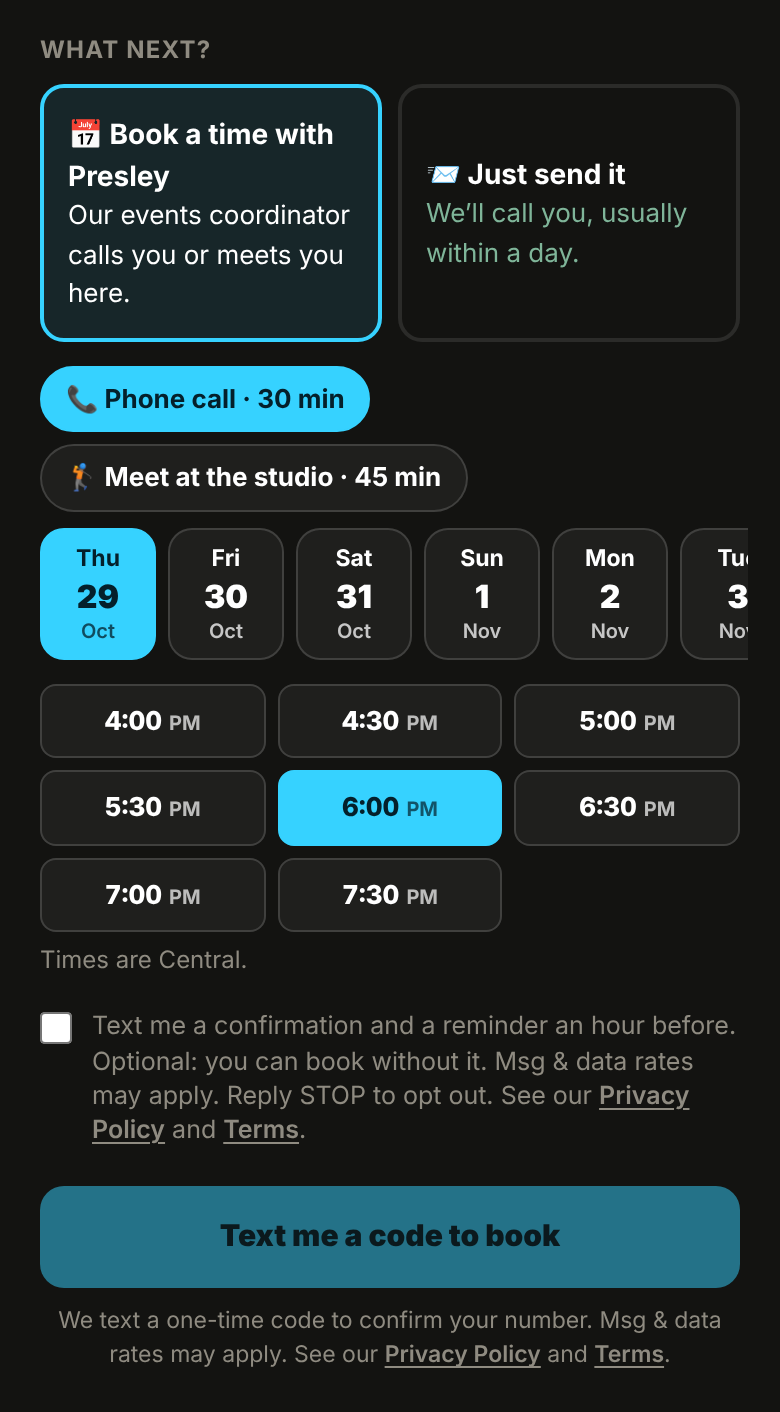
Screenshot: Booking a call with our events coordinator: a time picked and the optional confirmation and reminder box, unticked.
Example messages
- Texas Wedge: Your sign-in code is 482913. It expires in 10 minutes. Reply STOP to opt out.
- Texas Wedge: You're booked for Fri, Oct 24 at 7:00 PM (Bay 3). Manage or cancel: https://app.texaswedge.golf/my-bookings Reply STOP to opt out.
- Texas Wedge: Reminder — your bay is booked tomorrow, Fri, Oct 24 at 7:00 PM (Bay 3). See you soon! Reply STOP to opt out.
- Hi Jordan, thanks for reaching out to Texas Wedge about your event! Presley Bowen, our Events Coordinator, will call you within 1 business day. Questions? Call or text (806) 516-5699.
3. Offers and events (optional, marketing)
Only for customers who ticked a separate, unticked box. Never about alcohol. Never needed to sign up, book or buy.
Account sign-up · see the page
An optional, unticked box under the name and email fields, separate from the booking texts notice. The account is made whether or not it is ticked.
“Text me deals & news — special offers, events, and member perks. Optional. Msg & data rates may apply; message frequency varies. Reply STOP to opt out. See our Privacy Policy and Terms.”
Check-in kiosk at the studio (in person)
A tablet at our front desk. A first-time customer types their mobile number to check in, then their name and email; this optional switch is off until they turn it on. Links to our Privacy Policy and Terms sit under the button. The screenshot below is the screen exactly as customers see it.
“Text me deals & news. Offers, events & member perks — optional. You'll still get texts about your own reservations. Message frequency varies. Msg & data rates may apply. Reply STOP anytime.”
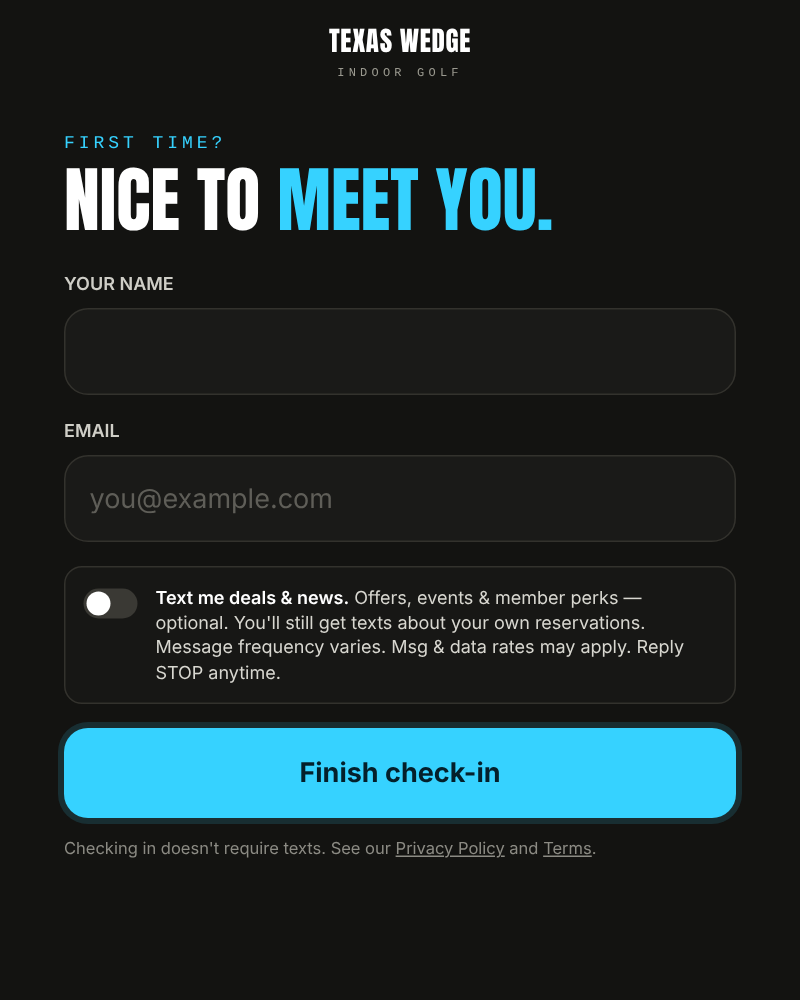
Screenshot: Check-in kiosk: name, email and the optional Text me deals & news switch, off. Membership sign-up (at the counter, or by a link we text them)
When a customer joins a membership at our counter, staff hand them the iPad, or text them a one-time link to finish on their own phone. Either way they see the same screen: an optional, unticked box, separate from the membership terms. The screenshot below is that screen.
“Text me Texas Wedge offers and events (optional). Message frequency varies. Msg & data rates may apply. Reply STOP to opt out.”
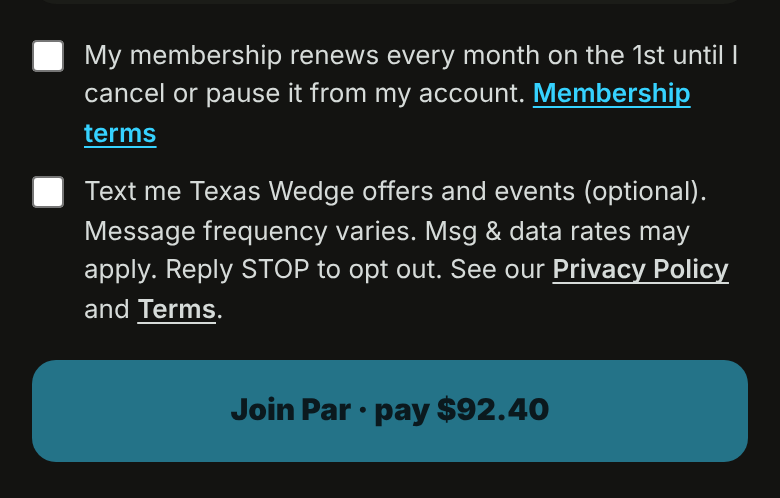
Screenshot: Membership sign-up: the renewal tick and the optional offers box, both unticked. League sign-up · see the page
An optional, unticked box on the league registration form. Registering for a league works without it. The mobile number is confirmed with a one-time code.
“Text and email me league updates from Texas Wedge: tour starts, weekly round reminders and results. Optional: you can sign up without it. Message frequency varies. Msg & data rates may apply. Reply STOP to opt out.”
Contact form · see the page
An optional, unticked box under the message field.
“Text me Texas Wedge offers and events. Optional: we'll answer your request either way. Message frequency varies. Msg & data rates may apply. Reply STOP to opt out.”
Offer pages (from our ads and posts)
Public pages at app.texaswedge.golf/offer/<name>, linked from our ads and social posts. The customer enters their mobile number and presses the button to have the offer code texted to them; this box is optional and unticked, and the offer is claimed either way. A yes is added to their account once the number is theirs as a customer (when they book). The exact sentence is saved with each yes. The screenshot below is an offer page.
“Text me occasional offers and events from Texas Wedge. Optional: you get this offer either way. Message frequency varies. Message and data rates may apply. Reply STOP to opt out at any time.”
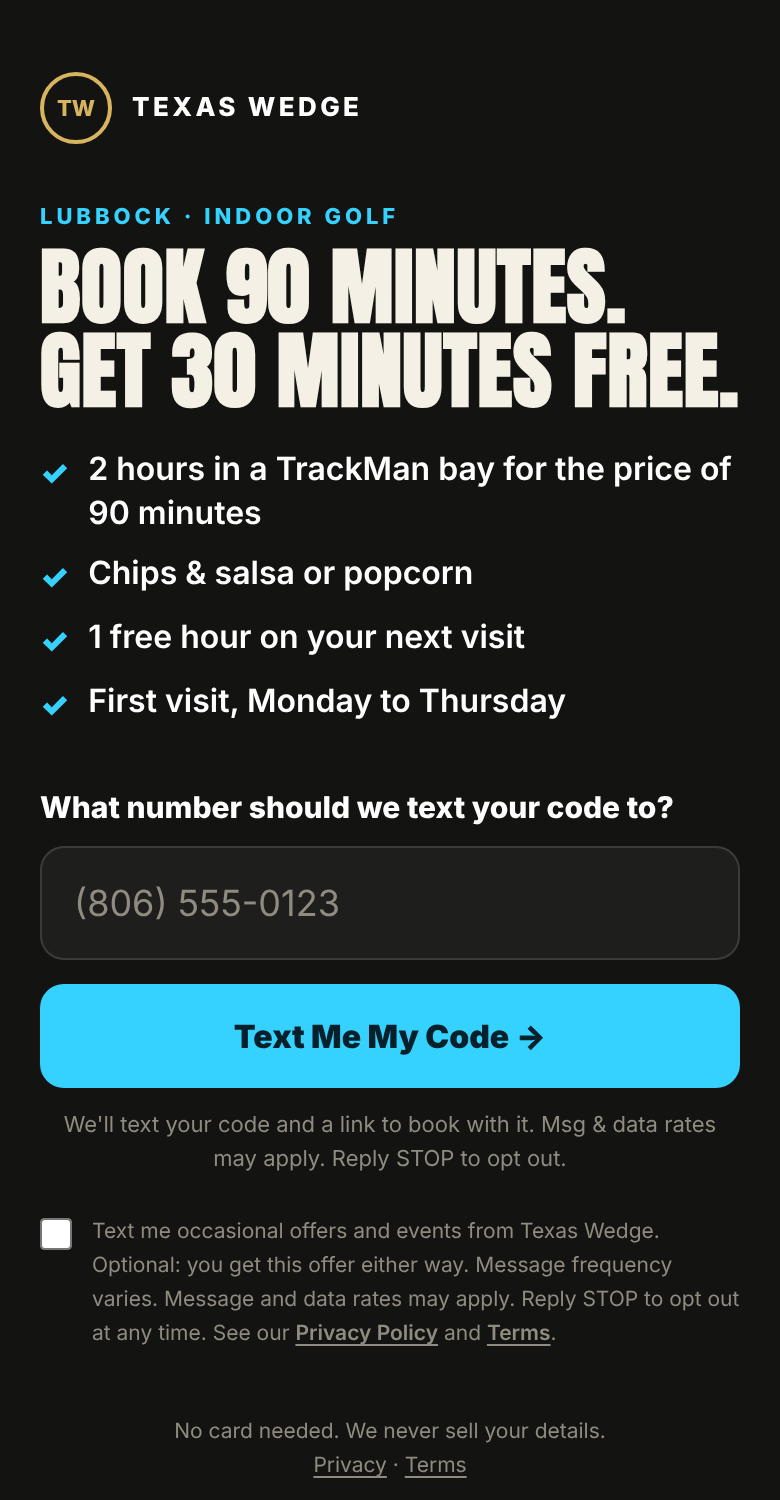
Screenshot: Offer page: the mobile number and the optional offers box, unticked.
Example messages
- Texas Wedge: League week 3 is open! Book your round by Tue 10 PM: https://app.texaswedge.golf/book Reply STOP to opt out.
- Texas Wedge: New group class this Saturday, 10 AM: Short Game Basics. Save your spot: https://app.texaswedge.golf/book/classes Reply STOP to opt out.
No alcohol offers
Our texts never advertise alcohol or drink specials. Our system checks every marketing text before it is sent and stops any that mention alcohol.
What happens after
Message frequency varies. Message and data rates may apply. Marketing texts are sent only between 9 AM and 9 PM Monday to Saturday and noon to 9 PM Sunday (Central time). Reply STOP to stop all texts, HELP for help, START to resubscribe.
We do not sell or share your SMS opt-in data or personal information with third parties for marketing purposes. See our Privacy Policy and Terms & Conditions.